Designing Spatial UI: Part 1.1
After reading this article by Michael Gilbert from Material Design. I wanted to apply some learning to the spatial medium. I was exploring spatial siz...
Designing Spatial UI: Part 1.1
Understanding Typography
After reading this article by Michael Gilbert from Material Design. I wanted to apply some learning to the spatial medium. I was exploring spatial sizing in my previous article.
Designing Spatial UI: Part 1Understanding Spatial Sizingsiddarth.design
Before we dive into sizing, here are some best practices that I came across when researching this topic,
Developer Portal | Magic LeapEdit descriptiondeveloper.magicleap.com
Font Size
Let get to the sizing part I found details about typography sizing on Hololens documentation and Nreal.

https://developer.nreal.ai/design/displaying
Pixel is not an appropriate way to understand spatial sizing let's convert it into a spatial unit.
14px is approximately equal to 3.704167mm. (1px is 0.26458333333719 mm)
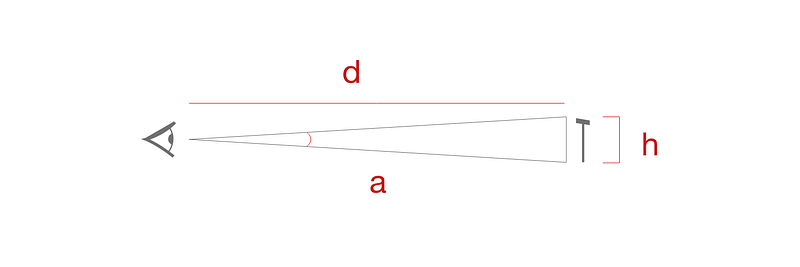
Viewing angle can be found using the formula 2*arctan(h/(d*2)) where h is the height of text and d is the distance at which we are viewing the text.
In our case h= 3.704167mm and d= 2000mm putting into the equation the viewing angle of a text of 14px would be 0.1061° at 2 m.
The viewing angle is comparatively low when compared to Microsoft Design which recommends 0.35°-0.4° at a distance of 2m.

https://docs.microsoft.com/en-us/windows/mixed-reality/design/typography#recommended-font-size
Now let us apply this viewing angle to the same formula.
h = tan(arad) * d_
h= tan(_0.35°)*2000
h= 12.2174mm which is ~46.176px or 35pt
Visual acuity
Applying the visual acuity calculation to the above values,
Sdenominator= ( h / tan( radians( 5/60° ) ) ) * ( 20 / d )
=( 12.2174 / tan( radians( 5/60° ) ) ) * ( 20 / 2000 )= 84.0006
A user needs to have about 20/84 visual acuity or better (either normal or corrected to normal) to read the text.
I have added a handy calculator for all the above calculations, hope it is useful.
More detailed documentation from Niteesh Yadav
https://xr-typography.niteeshyadav.com/type-selection/letter-spacing