Understanding OpenClaw
The Architecture of an Autonomous Personal Agent
Understanding OpenClaw
The Architecture of an Autonomous Personal Agent
We started in the Age of the Oracle. We typed prompts into isolated web interfaces and waited for text. The interaction was purely transactional — the moment we closed the browser tab, the AI forgot us and sat idle. That era is ending.
What follows is something different: AI that runs on your own hardware, remembers across sessions, acts without being prompted, and reaches you through the messaging apps already in your pocket. Not a chatbot. Not a service you rent. A personal agent you own.
OpenClaw is the open-source framework that makes this real. At 346,000 GitHub stars and 24,800 commits, it is the most widely adopted autonomous agent platform in the world. This is a comprehensive breakdown of how it actually works — not the marketing version, but the architecture as it exists in source.

I. What OpenClaw Actually Is
OpenClaw is a personal AI assistant platform that runs on your own infrastructure. It connects AI models — Claude, GPT, Gemini, DeepSeek, or local models — to the messaging channels you already use: WhatsApp, Telegram, Slack, Discord, Signal, iMessage, Microsoft Teams, and fifteen more. The Gateway is a WebSocket control plane. The product is the assistant.
It was built by Peter Steinberger for Molty, a space lobster AI assistant, and released in November 2025. The name has changed twice (Clawdbot → Moltbot → OpenClaw), but the architecture has stayed consistent: a local-first daemon that connects models to channels, tools, and memory.
The system runs on Node.js, stores configuration in JSON5, persists memory in SQLite, sandboxes untrusted sessions in Docker, and extends through a formal plugin system. The agent runtime is powered by @mariozechner/pi-agent-core, a library by Mario Zechner that handles tool streaming and block streaming in a continuous async loop.
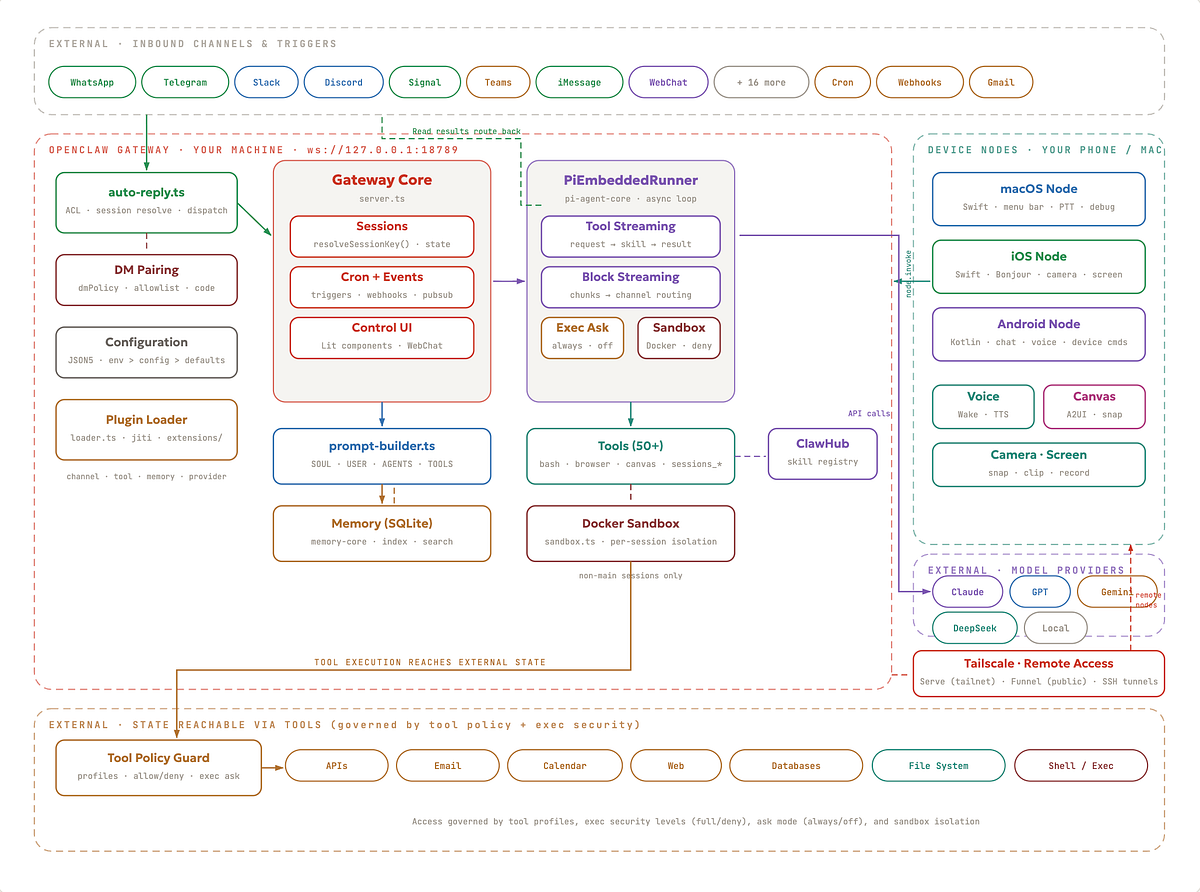
II. The Agent Loop
When a message arrives — or a cron job fires, or a webhook triggers, or a Gmail Pub/Sub event pushes — it enters the agent loop. This is the core execution cycle.
The loop has eight phases.

Trigger. Four entry points: scheduled cron jobs, inbound user messages via any of 24+ channels, webhook payloads from external services, and Gmail Pub/Sub push notifications. Each trigger wakes the Pi agent runtime from idle.
Auto-Reply Router. Before anything reaches the agent, every inbound message flows through the unified routing hub. This layer handles access control (allowlists, DM pairing policies), resolves the session key, and dispatches to the correct agent instance. This is the layer that decides whether a message gets processed at all.
Context Compile. The prompt builder assembles the LLM prompt. SOUL.md — the immutable directives — is always loaded. USER.md provides owner context. AGENTS.md sets persona constraints. TOOLS.md defines available capabilities. The builder then queries the memory search system to inject relevant facts from SQLite. Only matching context is injected — never the full history. This is how the system maintains long-term continuity without burning through context windows.
PiEmbeddedRunner. The agent runtime operates as an async generator function — a while(true) loop with tool streaming and block streaming. It processes the assembled context, determines which skills to invoke, classifies each action as Read or Write, and plans execution sequences. Model failover handles provider switching via OAuth and API key rotation.
Skill Call. The runtime invokes tools: bash, read/write/edit, browser control (CDP-managed Chromium), Canvas (A2UI push/eval/snapshot), node commands (camera, screen recording, location), session coordination (sessions_list/sessions_send/sessions_spawn), cron management, and platform actions. Non-main sessions execute inside Docker sandboxes. Skills from ClawHub can be auto-discovered and pulled at runtime.
Tool Policy. Before execution, tool policy governs what the agent can do. Tool profiles (messaging, minimal, full) restrict which categories of tools are available. Allow/deny lists block specific tool groups per agent. Exec security levels control shell access: security="full" allows execution, "deny" blocks it entirely. Ask mode determines whether the owner is prompted before execution: ask="always" requires confirmation, ask="off" runs silently. The default for personal assistant setups is security="full", ask="off" — meaning no prompts. Non-main sessions run inside Docker sandboxes with restricted tool access regardless of these settings.
Response. Results are formatted and routed back to the originating channel. The system supports streaming and chunking per channel, presence and typing indicators, and a media pipeline that handles images, audio, and video with transcription hooks and size caps.
Memory Write. The memory-core plugin indexes new facts into SQLite. Session pruning compacts context to prevent overflow. Usage is tracked. Session state — thinking level, model, send policy, group activation — is persisted. The next loop iteration has full history available to the prompt builder.
III. The Gateway
At the centre of the architecture sits the Gateway, a WebSocket server bound to ws://127.0.0.1:18789. It is the single control plane for the entire system — sessions, channels, tools, events, cron jobs, webhooks, and system health all flow through it.
The Gateway binds to localhost by default. A deny-by-default posture means no external traffic reaches the reasoning engine unless explicitly routed. For remote access, OpenClaw integrates with Tailscale: Serve mode exposes the Gateway over a tailnet (using Tailscale identity headers), while Funnel mode enables public HTTPS (requiring password authentication). SSH tunnels are supported as an alternative.
The Gateway serves two web surfaces directly: a Lit-based Control UI for system administration, and WebChat for browser-based messaging. Both are web component applications — no separate frontend server required.
Configuration lives in ~/.openclaw/openclaw.json (JSON5 format). The loader applies a clear precedence: environment variables override config file values, which override system defaults. Schema validation uses TypeBox and Zod. The openclaw doctor command auto-migrates legacy paths and config schemas.
IV. The Memory System
The memory system is not a collection of flat markdown files appended over time. It is a SQLite-backed storage layer with indexing and search, powered by the memory-core plugin.
The system has three components. Storage persists facts and session history in SQLite — structured, queryable, and durable. Indexing automatically extracts facts from conversations and indexes them for retrieval. Search allows the prompt builder to query and inject only the relevant context for a given task. The full history never loads at once.
The workspace files — SOUL.md, USER.md, AGENTS.md, TOOLS.md — still live as markdown. These are the identity layer: immutable directives, owner profile, persona routing rules, and capability definitions. They are loaded by the prompt builder alongside memory search results to assemble each prompt.
Template files (BOOTSTRAP, IDENTITY, SOUL, TOOLS, USER) handle session initialization. Skills live with workspace skills taking precedence over managed and bundled ones.
V. Channels: Core and Plugin
OpenClaw connects to 24+ messaging surfaces. The architecture draws a clean boundary between core channels (shipped in src/) and plugin channels (loaded from extensions/).
Core channels are built into the main codebase: WhatsApp (Baileys), Telegram (grammY), Slack (Bolt), Discord (discord.js), Google Chat (Chat API), Signal (signal-cli), BlueBubbles (iMessage, recommended), iMessage (legacy), IRC, and WebChat (built-in, served from the Gateway).
Plugin channels load through the extension system: Microsoft Teams (Bot Framework), Matrix, WeChat (official Tencent plugin, Feishu, LINE, Mattermost, Nextcloud Talk, Nostr, Synology Chat, Tlon, Twitch, and Zalo.
Every channel — core or plugin — routes through the same auto-reply.ts layer. Each implements four concerns: authentication (bot tokens, QR login, OAuth), inbound parsing (text, media, reactions, threads), access control (allowlists, pairing, DM policies), and outbound formatting (markdown rendering, message chunking, media uploads).
Group messaging is a first-class concern. Channels support mention gating (requireMention), reply tags, per-channel chunking, and configurable activation modes (mention-only vs always-on).
VI. The Plugin Architecture
OpenClaw’s extensibility is not ad-hoc. The plugin loader scans extensions/ for packages that declare an openclaw.extensions field in their package.json. Each plugin specifies its type, config schema (TypeBox), and entry point. The loader validates schemas, loads plugins via jiti, and registers them into the appropriate slot.
There are four plugin types.
Channel plugins register into the channel router. They implement the same four-concern interface as core channels (auth, parsing, ACL, formatting). MS Teams, Matrix, and WeChat are all channel plugins.
Tool plugins register into the tool registry. They extend what the agent can do — custom API integrations, specialised data processing, or novel interaction modes. Managed via ClawHub or the workspace skills directory.
Memory plugins register into the memory search layer. The memory-core plugin provides the default SQLite-backed implementation. The interface is replaceable — you could swap in a vector database or external storage backend.
Provider plugins register into the model routing layer. They add support for new LLM providers with OAuth or API key authentication and failover chains.
VII. The Session Model
When a message arrives, resolveSessionKey() determines which session it belongs to. The key format encodes the session type: main for direct owner chats, dm:channel:id for DMs from other users, and group:channel:id for group conversations.
Main sessions have full host access. Tools run directly on the machine. No sandbox. This is the trusted execution context — it is you, talking to your agent, on your hardware.
Group sessions are isolated per-channel. Activation can be mention-only or always-on. Reply tags, message chunking, and queue modes handle the complexity of multi-user conversation. Each group gets its own session state.
Sandbox sessions run inside per-session Docker containers via src/agents/sandbox.ts. The tool allowlist is restricted: bash, read, write, edit, sessions_list, sessions_history, sessions_send, sessions_spawn. The denylist blocks browser, canvas, nodes, cron, discord, and gateway. This is the security boundary for untrusted contexts.
VIII. Safety and Security
OpenClaw’s security model follows a principle the docs call “access control before intelligence” — security decisions happen at the access and policy layer, not at the individual action level. The model has three layers.
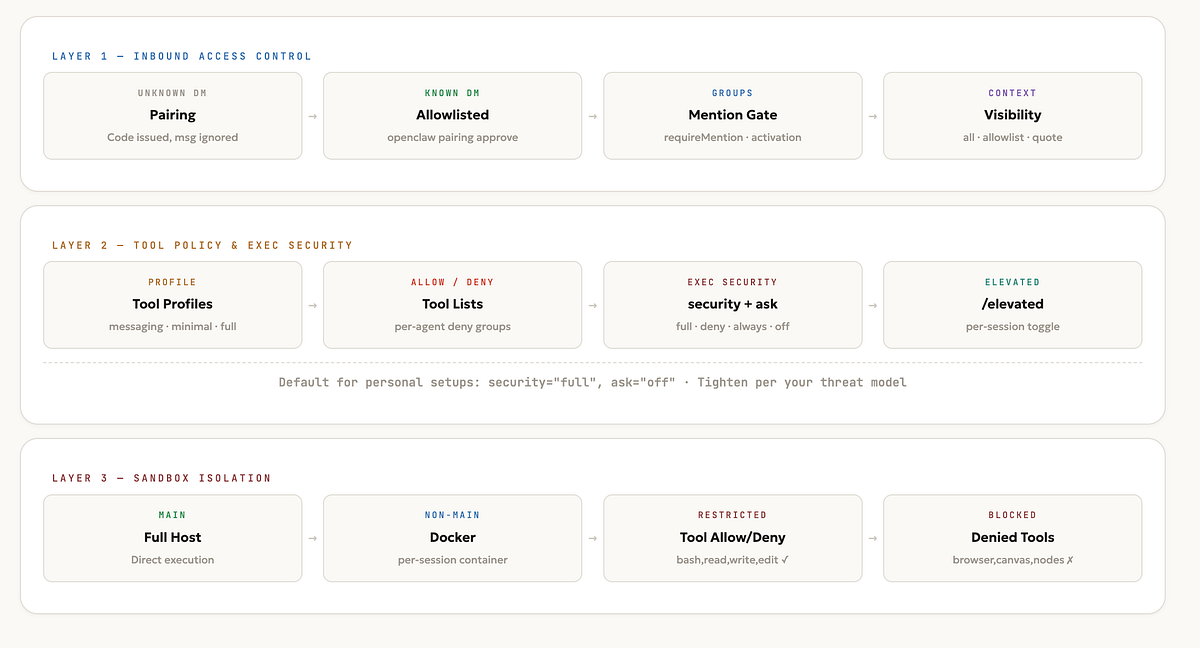
Inbound Access Control handles who can talk to the bot. When an unknown sender messages on any channel, dmPolicy="pairing" kicks in: a short pairing code is issued, the message is ignored, and no processing occurs until the owner explicitly runs openclaw pairing approve. The sender is then added to a local allowlist. Public inbound DMs require an explicit opt-in (dmPolicy="open" with "*" in the allowlist). Groups use mention gating (requireMention), activation modes, and context visibility controls (contextVisibility: "all", "allowlist", or "allowlist_quote") to filter what reaches the agent.
Tool Policy and Exec Security handles what the agent can do. Tool profiles (messaging, minimal, full) restrict categories of available tools. Allow/deny lists block specific tool groups per agent (tools.deny: ["group:runtime", "group:fs"]). Exec security levels control shell access: security="full" allows, "deny" blocks entirely. Ask mode determines whether the owner sees a prompt before execution: ask="always" requires confirmation, ask="off" runs silently. The default for personal assistant setups is security="full", ask="off" — meaning no prompts. The /elevated on|off command provides a per-session toggle for elevated tool access. The docs are explicit about this: "OpenClaw's product default for trusted single-operator setups is that host exec on gateway/node is allowed without approval prompts. That default is intentional UX, not a vulnerability."
Docker Sandboxing handles execution isolation. Non-main sessions (groups, DMs from other users) run inside per-session Docker containers with restricted tool access. The tool allowlist is restricted to bash, read, write, edit, and sessions_*. The denylist blocks browser, canvas, nodes, cron, and gateway. This prevents a compromised group session from reaching the host filesystem, browser, or device nodes.
Run openclaw security audit (not just doctor) to flag common footguns: gateway auth exposure, browser control exposure, elevated allowlists, permissive exec approvals, and open-channel tool exposure. The --deep flag adds live Gateway probes. The --fix flag auto-remediates where possible.
IX. Nodes and Companion Apps
The Gateway runs the control plane. Nodes extend it to your devices, exposing hardware capabilities via node.invoke over the Gateway WebSocket.
macOS (apps/macos/, Swift). A menu bar application that serves as the local control plane. Voice Wake and push-to-talk overlay for hands-free interaction. WebChat and debug tools built in. Remote gateway control over SSH. In node mode, exposes system.run, system.notify, Canvas, and camera to the agent.
iOS (apps/ios/, Swift). A companion node that pairs via Bonjour. Exposes Canvas, Voice Wake, Talk Mode, camera, and screen recording. Controlled via openclaw nodes CLI commands.
Android (apps/android/, Kotlin). Connect, Chat, and Voice tabs. Canvas, camera, and screen capture. Exposes device command families: notifications, location, SMS, photos, contacts, calendar, motion, and app updates.
Canvas and A2UI is a cross-platform visual workspace. The agent can push content, reset the view, evaluate code, and take snapshots. The A2UI host protocol runs over the Gateway WebSocket. Available on macOS, iOS, and Android.
Voice Wake and Talk Mode provide hands-free interaction. Wake words trigger on macOS and iOS. Continuous voice mode runs on Android. ElevenLabs provides high-quality TTS with system TTS as fallback. A transcription pipeline handles audio input.
X. A Day in the Life
Architecture is abstraction. Here is what it looks like when the system actually runs.
07:00 — Morning Briefing. A cron job fires. The prompt builder loads SOUL.md, USER.md, and queries the SQLite memory for relevant context. Three Read skills execute in sequence: weather lookup, inbox scan via IMAP, and calendar pull. The results synthesise into a morning summary that routes to WhatsApp through auto-reply.ts. The owner's phone buzzes with weather, top emails, and the day's schedule. No prompt was typed. No browser was opened.
08:30 — Voice Wake. “Hey Molty, what’s my first meeting?” The wake word triggers on the macOS node. Talk Mode activates. PiEmbeddedRunner fetches the calendar (Read Action), synthesises the answer, and responds via ElevenLabs TTS. The entire interaction happens without touching a keyboard.
09:15 — Inbox Monitoring → Email Reply. The hourly inbox check finds a client meeting request. The agent drafts a confirmation reply. In the default personal setup (security="full", ask="off"), the email sends without a prompt. If the owner had configured ask="always", they would see a confirmation request in Telegram before the send executes. The tool policy — not a per-action gate — governs what happens.
11:00 — Unknown DM. Someone messages the bot on WhatsApp. They are not on the allowlist. dmPolicy="pairing" activates. A short pairing code is issued. The message is ignored. No processing occurs until the owner runs openclaw pairing approve whatsapp <code>.
14:00 — Browser Research. The owner messages on Slack: “Analyse the competitor’s pricing page.” The Browser Control tool launches a managed Chromium instance via CDP, navigates to the URL, takes snapshots, and extracts structured data. Tool policy allows browser access for the main session. Results return in Slack.
16:00 — Agent-to-Agent Coordination. The research agent uses sessions_send to pass its findings to the main session. The main agent synthesises the research and pushes a visual summary to the Canvas via A2UI. The owner opens the Canvas on their iPhone to review.
22:00 — Memory Consolidation. A scheduled cron job triggers. The memory-core plugin reviews the day's interactions, extracts key facts — "Client X confirmed Thursday meeting," "Competitor pricing page analysed," "Owner interested in Canvas workflows" — and indexes them into SQLite. Session pruning compacts context. Tomorrow morning, the prompt builder has access to today's decisions without exceeding a context window.
XI. Deployment
OpenClaw supports four deployment patterns, all serving the same client interfaces (CLI, Web UI, mobile apps).
Local development runs via pnpm dev on a developer machine. State lives in ~/.openclaw/. Access is loopback only.
macOS production installs the Gateway as a LaunchAgent daemon via openclaw onboard --install-daemon. The macOS app provides menu bar control. State in ~/.openclaw/. Access via loopback, SSH, or Tailscale.
Linux/VM runs the Gateway as a systemd user service on a VPS or VM. Access via SSH tunnel or Tailscale Serve/Funnel. This is a common pattern for always-on deployments.
Cloud (Fly.io) runs in a Docker container with a persistent volume. HTTPS ingress via Fly.io’s network. Configuration via fly.toml.
In all cases, the Gateway binds to loopback by default. Non-loopback bindings require token or password authentication. Tailscale exposure enforces this automatically.
The transition from passive user to active architect of your own AI infrastructure has already begun. OpenClaw is the framework for making that transition deliberately.
Here is a quick starter guide to get your OpenCLAW running