Designing for Phone-based VR
Understanding the different input for interactions.
Designing for Phone-based VR
Understanding the different input for interactions.
Virtual reality has the power to take you anywhere, letting you experience as if you are there. VR can be primarily categorized based on the content type and headset.
Phone-based VR has made simple VR accessible, enabling millions of people to try out VR experiences. But it was more intended for enjoying short experiences like watching virtual reality videos or taking a virtual expedition. Though the phone-based VR hasn’t created a more considerable impact, it is still relevant for experiences in fields like education.
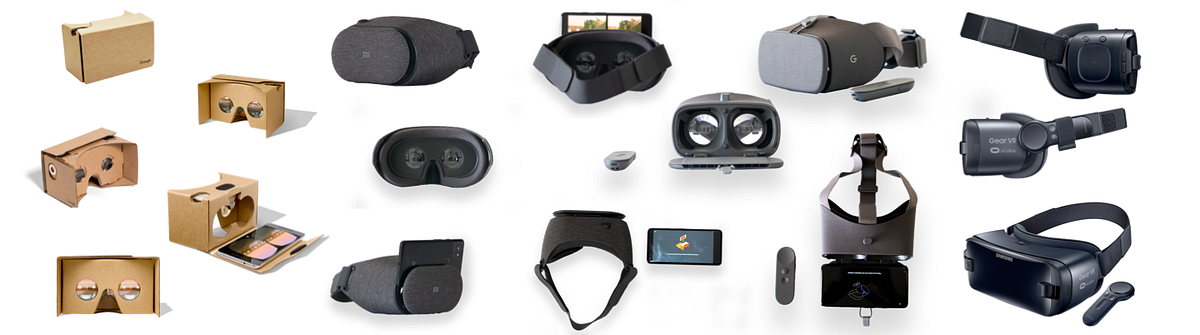
While designing for Phone-based VR, a few things we should be aware of are,
Type of input:
Input for phone-based VR ranges from no input to 3DoF controllers with more options.
The entry-level cardboard devices are based on one button interactions,

- Gaze — Gaze is the basic input method for an XR experience. It helps us to identify where the user is looking at in the VR space. Gaze based timers (Fuse buttons) are used to mimic the click actions when there are no physical buttons or controllers.

Gaze based object selector.

Fuse Button, Timer-based gaze trigger.

Objects getting selected based on user gaze.
- Magnet — The older version of the cardboard had magnetic input. They are not recommended currently as they are less reliable. It worked based on the magnetometer in the smartphones.
- Conductive Button — A mechanical input that is ultimately registered as a screen touch, but the user’s finger is not touching the screen directly.
- Direct Touch — No inputs, but the user can touch the smartphone screen with the finger without taking the phone out of the viewer.
- Controller — External accessories usually connected via Bluetooth. Lets you perform more actions than just clicks like scroll, drag, tilt, rotate, and more.

Daydream and Galaxy Gear VR Controls

Daydream VR
- On-Device Controller — Devices like Gear VR also have on-device control buttons and touch-pads.
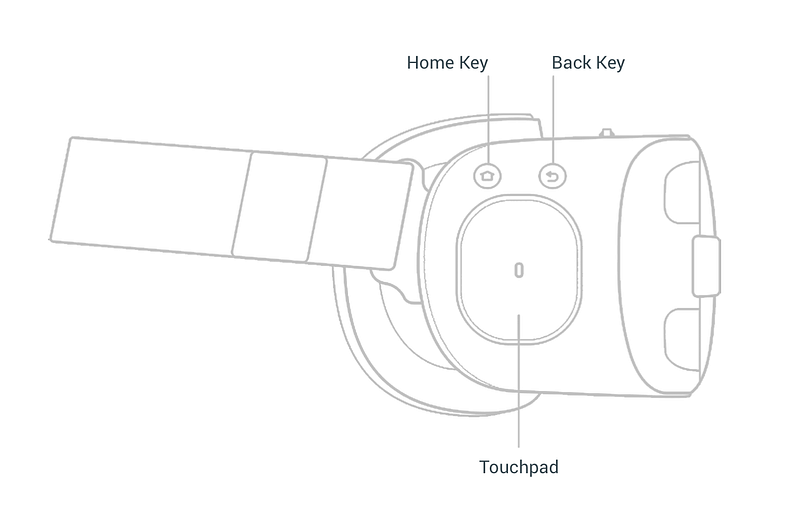
Samsung Gear VR